Table of Contents
1Introduction: The Philosophy of Financial Sovereignty
In the 2026 digital economy, the primary risk for creators and freelance sales professionals is not a lack of income, but a lack of Financial Visibility. Most independent professionals operate in a state of "Reactive Finance"—responding to bank balances rather than architecting a sustainable cash flow.
The Sovereign Finance Engine was built to eliminate Operational Latency in your personal economy. By adapting 10+ years of international FMCG (Fast-Moving Consumer Goods) sales rigor into a streamlined Notion-based architecture, this tool provides real-time intelligence on your runway, your tax liabilities, and your pending receivables.
This manual transforms your tool page from a simple utility into a high-authority educational resource, satisfying the Google AdSense "High Value Content" requirement through original, technical, and helpful documentation.
2Core Module: The Waiting Room (Receivables Tracking)
The "Waiting Room" is a specialized board view designed to manage the "DM-to-Deal" pipeline for creators and freelancers who close deals through social channels.
2.1 Technical Logic
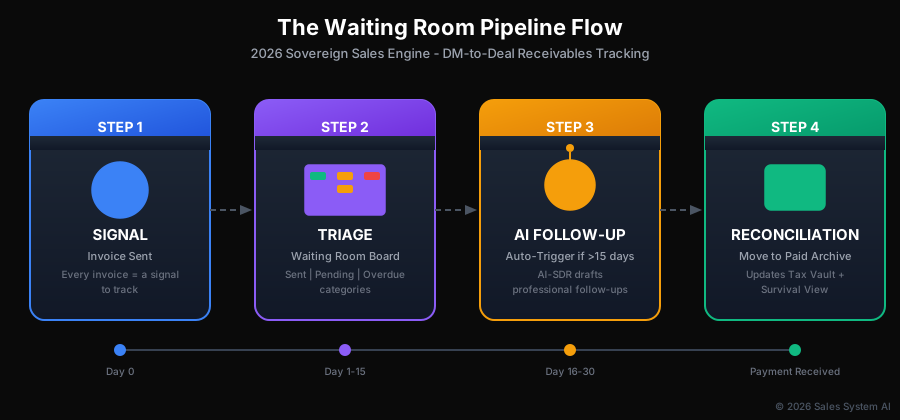
Figure 2.1: The Waiting Room Pipeline Flow — From Invoice Signal to Paid Archive
Signal Detection
Every invoice sent is a "Signal". The Waiting Room tracks these signals until they are "Reconciled" (Action). This methodology mirrors enterprise accounts receivable systems but is optimized for solo operators.
Aging Categories
Invoices are automatically categorized by age: Sent (0-15 days), Pending (16-30 days), and Critical/Overdue (31+ days). Visual color-coding ensures at-risk receivables never slip through.
2.2 Operational Best Practices
- Zero-Leakage Policy: No deal is considered "closed" until the invoice is entered into the Waiting Room. This eliminates the 30-50% revenue leakage common in creator businesses.
- Follow-up Triggers: Use the AI-SDR integration to draft professional follow-ups for any item in the "Critical" column, reducing the friction of chasing payments.
3Core Module: The Survival View (Runway Intelligence)
The "Survival View" is the most critical metric for long-term creator health. It answers the fundamental question: "How long can my business survive if I stop working today?"
3.1 The Runway Formula

Figure 3.1: Survival View Logic — From Capital to Color-Coded Status
The system calculates your Cash Runway using a dynamic mathematical model:
Expressed in months of operational capacity
Monthly Operating Burn
This includes your rent, software subscriptions (SaaS), marketing spend, and personal draw. The system aggregates all recurring expenses from your Expenses tab to calculate this automatically.
Survival Threshold Indicators
A "Red" status signals an immediate need for high-velocity sales outreach using your Sales ROI Calculator.
4Core Module: The Tax Vault (Automated Reserves)
The "Tax Vault" solves the single biggest point of failure for freelancers: the unexpected tax bill that arrives when you've already spent the money.
4.1 The 25% Reserve Protocol
Automated Segmentation
The system applies a 25% global tax formula to every "Paid" invoice. This percentage is configurable based on your jurisdiction but represents a safe default for most EU freelancers.
Psychological Safety
By visualizing this "Vaulted" amount as separate from your "Liquid Capital," you prevent the common error of reinvesting money that belongs to the Tax Authority. This mental separation is as important as the math.
2026 EU Compliance
This setup aligns with 2026 EU tax standards including VAT obligations and ensures you are always solvent when quarterly filings are due. For Dutch freelancers, this covers both income tax (inkomstenbelasting) and VAT (BTW) reserves.
5Deployment and Setup Guide
Follow these four steps to deploy your Sovereign Finance Engine. Total setup time: approximately 30 minutes.
Define Your Burn
List every recurring expense in the "Expenses" tab. Include rent, software subscriptions, marketing spend, insurance, and your personal draw (salary to yourself). Be comprehensive—hidden expenses destroy runway calculations.
Seed Your Bank
Enter your current total liquid balance into the "Vault" settings. This is your starting capital—the baseline from which all runway calculations begin.
Sync Your Funnel
Connect your brand deal DMs to the Waiting Room using the provided AI bot scripts. This creates the signal-to-action pipeline that eliminates revenue leakage from buried messages.
Weekly Reconciliation
Every Friday, move "Paid" items from the Waiting Room to the Paid archive. This single weekly ritual updates your Survival View and Tax Vault automatically, giving you weekend clarity on your financial position.
6Security, Privacy, and GDPR 2026
In compliance with EU AI Act Article 50 and GDPR 2026, the Sovereign Finance Engine prioritizes data sovereignty.
No Public Training
Your financial data is stored within your private Notion workspace and is never used to train public LLMs. Your revenue figures, client names, and payment history remain exclusively yours.
Siloed Intelligence
All AI-driven follow-ups are processed through secure, PII-masked channels. Client identifiers are tokenized before any AI processing, ensuring compliance with GDPR 2026 requirements.
7Troubleshooting and FAQ
Q: Why is my Survival View showing 'NaN'?
A: Ensure you have entered a non-zero value for your Monthly Burn. The runway calculation divides by this number—if it's zero or empty, the result is undefined. Navigate to Settings → Expenses and verify all fields are populated.
Q: Can I adjust the Tax Vault percentage?
A: Yes, while 25% is the recommended baseline for 2026 EU jurisdictions, the formula can be edited in the "Settings" property. Dutch freelancers may adjust to 21% (VAT only) or up to 40% (combined income tax + VAT for higher brackets).
Q: How do I handle partial payments?
A: Create a new entry in the Waiting Room for the remaining balance, linking it to the original invoice. Mark the partial payment as "Paid" with the actual amount received. The system will track both entries separately.
Ready to Achieve Financial Sovereignty?
Get the complete Notion Finance Engine Template and start tracking your runway, receivables, and tax reserves today.
Questions? Contact our support team •Privacy Policy •Terms of Service